If you have ever wondered how to convert audio to text and actually use the information afterward, you are not alone. Many people record meetings, interviews, and voice notes, only to end up with long transcripts that are difficult to review.
Tools like Vomo.ai are changing that experience. Instead of just turning recordings into text, they allow you to interact with your transcripts through AI Scribe—making it possible to quickly find answers, summaries, and key ideas inside your recordings.
Think about a typical scenario. You record a two-hour meeting, convert the file using audio to text, and suddenly you have a 50-page transcript. The information is technically there, but reading through every line to find one decision or action item can feel overwhelming.
Traditional transcription tools focus on capturing words. What they often miss is helping you understand and use the content quickly.
This is where AI Scribe technology makes a difference. By combining accurate speech recognition with conversational AI, modern transcription tools allow you to interact with your recordings. Instead of scrolling through pages of text, you can simply ask the transcript questions—like requesting a summary, identifying key decisions, or pulling out action points from the conversation.
Beyond Static Text: Why Conversational AI is the Future of Audio to Text
Imagine you have just finished a marathon three-hour strategy session with global stakeholders.
You now have a massive transcript in front of you, but the deadline for the executive brief is only thirty minutes away. In the past, you would have to manually scrub through the text to find that one specific budget figure or client objection.
This “wall of data” effectively becomes a productivity graveyard where critical insights go to die.
The game changes entirely when your audio to text output stops being a passive document and starts being an active participant. Instead of reading, what if you could simply ask your recording, “What were the three main risks identified by the legal team?” This is the core promise of AI Scribe technology.
By integrating conversational intelligence into your workflow, platforms like Vomo.ai ensure that your spoken words are instantly transformed into a searchable, interactive intelligence hub.
Adopting a conversational workflow provides several transformative benefits:
- Zero-Search Retrieval: Ask questions to find specific quotes instantly.
- Instant Asset Creation: Command the AI to draft emails or blog posts from the text.
- Contextual Clarity: AI identifies the sentiment and underlying intent of speakers.
- Eliminated Overload: Focus on the high-level strategy instead of the clerical cleanup.
The Technical Standard: What Makes a Transcript “Chat-Ready”?
High-quality interaction depends entirely on a sub-70ms latency threshold. If the text lags significantly, the AI assistant cannot provide real-time support. This technical precision ensures a seamless audio to text user experience.
Accurate Speaker Diarization must reach at least a 95% accuracy benchmark. Without clear speaker labels, the AI transcription will attribute decisions incorrectly. Precise identification is the foundation for any reliable speech to text online platform.
The system must also utilize advanced NLP algorithms for contextual understanding. Modern automated transcription engines now handle complex industry jargon and accents. High-performance models like Nova-2 ensure your audio to text files are flawless.
Step-by-Step Guide: How to Transcribe Audio to Text Online
Mastering how to transcribe audio to text for professional use involves a streamlined workflow that prioritizes speed and fidelity. Following these stages will ensure your data is perfectly prepared for an interactive session.
1. Centralizing Your Audio and Video Sources
The first step is gathering your raw recordings into a single dashboard. Vomo.ai provides a universal entry point where you can manage various inputs without technical friction:
- Live Recording: Capture clear audio directly through the mobile app.
- File Uploads: Drag and drop MP3, WAV, or MP4 files instantly.
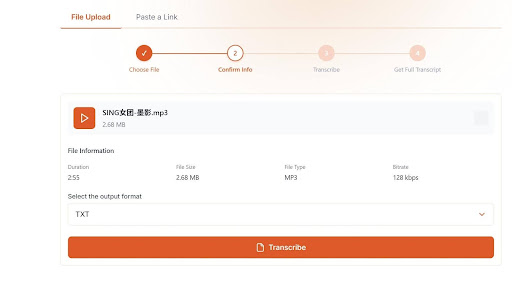
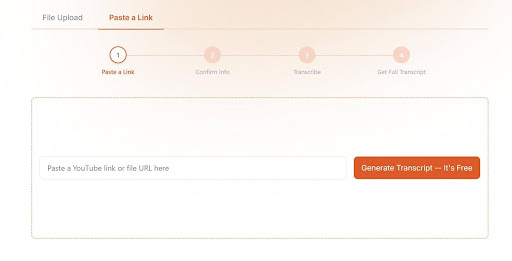
- YouTube Links: Paste a URL to transcribe YouTube video to text directly.
- Voice Memos: Import existing recordings from your smartphone with one tap.
2. Initiating the AI Transcription Process
Once your file is selected, the audio to text engine begins its work. Vomo.ai uses the Nova-2 engine to automatically detect the language and dialect being spoken.
This automated phase typically processes a full hour of audio in just a few minutes, delivering a structured draft with accurate timestamps.
3. Activating the AI Scribe for Knowledge Extraction
With your transcript ready, you can now move into the interaction phase. Open the Ask AI window to begin querying your data like a personal researcher.
You can instruct the system to “Summarize the key takeaways” or “List all action items,” turning your raw AI transcription into a ready-to-use professional asset.
The Magic of Ask AI: How to Chat with Your Transcripts
This is the “magic” phase where raw text becomes actionable insight. Instead of reading through pages of dialogue, you open the Ask AI window to query your data directly. This transforms the audio to text output into a dynamic intelligence hub.
You can issue specific commands like “Summarize the three biggest risks discussed in this session.” The AI will scan the entire transcript and provide a concise breakdown in seconds. This level of extraction is what differentiates a standard converter from a true AI Scribe.
Furthermore, you can prompt the AI to “Redesign these notes into a blog post” or “Draft a follow-up email to the participants.” These generated assets can be integrated directly into your existing notes, ensuring that the AI transcription leads directly to project momentum.
Industry Use Cases: Transforming Spoken Words into Strategic Assets
- For Doctors: Accurate capture of patient consultations with automated follow-up plans. This allows clinicians to focus on care rather than paperwork.
- For Lawyers: Capture verbatim records of depositions with precise speaker identification. This simplifies case preparation by summarizing critical legal evidence instantly.
- For Creators: Transform podcast episodes into SEO-optimized articles and social media snippets. This allows for massive content repurposing in a fraction of the time.
Audio Capture Best Practices for Flawless Interaction
To reach the coveted 99% accuracy benchmark, hardware optimization is essential. Experts recommend keeping the microphone between 12 and 18 inches from the primary speaker. Using directional microphones further isolates speech from background noise, boosting recognition in real-world environments.
Additionally, always specify the dialect in your speech to text online settings before starting. This helps the AI call the correct acoustic model, especially for technical or industry-specific jargon.
Remember: high-quality input is the foundation of a high-quality “chat.”
Navigating Security: Ensuring Data Privacy in AI Scribe Platforms
In 2026, privacy is the non-negotiable floor for professional workflows. Secure platforms advocate for a text-only processing model. This means the system analyzes the transcript but does not store or download raw media files, significantly reducing the risk of data leaks.
Ensure your audio to text provider utilizes end-to-end encryption and complies with GDPR or SOC2 standards. Crucially, verify that the platform does not use your private audio to train external large language models. Your strategic intelligence should remain exclusively yours.
Conclusion: Elevate Your Productivity with Interactive Transcription
The era of passive dictation is over. Today, mastering how to transcribe audio to text isn’t just about getting words on a screen—it’s about turning unstructured conversations into a searchable, interactive knowledge base.
Don’t let your best ideas stay trapped in a messy audio file. It’s time to delegate the heavy lifting to a true AI Scribe. Instead of dreading your next post-meeting write-up or spending hours scrubbing through a recording, simply drop your latest audio file into Vomo.ai. Watch your spoken words transform into organized, actionable insights before your coffee even gets cold.